Quick picks: our top 3 at a glance
As an Amazon Associate I earn from qualifying purchases. Prices and availability change.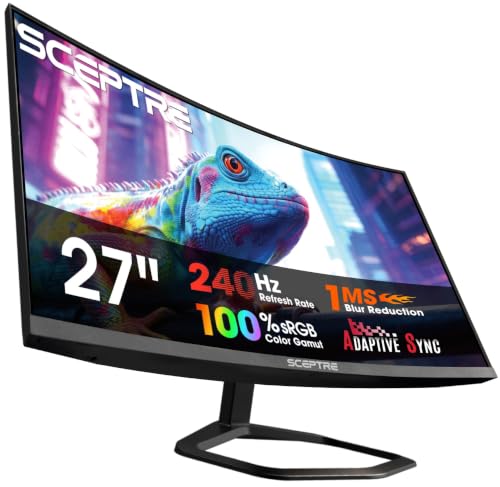


Cyber Monday is the perfect time to upgrade your battlestation. Whether you are a competitive esports player or a casual gamer, the right monitor can transform your experience. In this guide, we have analyzed 9 of the best cyber monday gaming monitor deals in November 2026, featuring top brands like Sceptre, Acer, SANSUI and more. We have also prepared a comprehensive buying guide to help you make an informed decision. If you are also exploring portable options, check out our best portable monitors roundup.
Gaming monitors have evolved dramatically. High refresh rates, low response times, and immersive curved panels are now accessible to most gamers. Our team of experts spent weeks researching the latest models, comparing specifications, and evaluating user feedback to bring you the most reliable list of cyber monday gaming monitor deals. Read on to discover which monitors made the cut.
At a Glance
| Product | Brand | Rating | Where to buy |
|---|---|---|---|
| Sceptre C275B-FWT240 27" 240Hz Curved | Sceptre | 4.1 / 5 | View on Amazon |
| Sceptre C248W-1920RN 24" Curved 75Hz Monitor | Sceptre | 4.8 / 5 | View on Amazon |
| SANSUI 32-Inch Curved 240Hz Gaming Monitor | SANSUI | 4.5 / 5 | View on Amazon |
| Sceptre E225W-FW144 22-Inch 144Hz Monitor | Sceptre | 4.5 / 5 | View on Amazon |
| Acer KB272 G0bi 27-inch FHD 120Hz Gaming Monitor | Acer | 4 / 5 | View on Amazon |
| Dell SE2726HG 27-Inch 240Hz IPS Gaming Monitor | Dell | 4.5 / 5 | View on Amazon |
| Sceptre C275B-FW180T 27-Inch Curved 180Hz Monitor | Sceptre | 4.1 / 5 | View on Amazon |
| Sceptre E275B-FW180T 27-Inch 180Hz Gaming Monitor | Sceptre | 4.1 / 5 | View on Amazon |
| Sceptre C345B-QU240T 34-inch Curved Gaming Monitor | Sceptre | 4.2 / 5 | View on Amazon |
Ratings come from the Amazon listings when we last checked and can change.
Pros
- 240Hz refresh rate ensures smooth motion in fast-paced games
- 1ms response time minimizes motion blur
- VA panel with 99% sRGB color gamut for accurate and vibrant colors
- Built-in speakers provide convenient audio without extra equipment
- Blue light shift technology helps reduce eye strain
Cons
- 1080p resolution may not be ideal for users who prioritize pixel density for productivity or content creation
- Curved design may not be preferred by all users
Pros
- Immersive 1800R curved panel wraps around the viewer
- 75Hz refresh rate for smoother motion than standard 60Hz
- Dual HDMI and VGA inputs provide flexible connectivity options
- VESA mount ready for easy wall or arm installation
Cons
- 250 cd/m² brightness may be modest for very bright rooms
- Built-in speakers often lack the audio quality of dedicated speakers
Pros
- 240Hz refresh rate with 1ms MPRT for smooth, responsive gameplay
- 1500R curvature enhances immersion at the recommended 1.2m viewing distance
- 125% sRGB color gamut and 3500:1 contrast for vivid visuals
- VESA 100x100mm mountable and includes a DP cable
Cons
- No built-in speakers, requiring external audio
- Full HD resolution on a 32-inch screen may look less sharp than smaller 1080p displays
- Limited tilt adjustment range (-5 to 15 degrees)

Pros
- Integrated speakers eliminate the need for external audio peripherals.
- 144Hz refresh rate provides smooth motion in games.
- Blue-Light Shift technology helps reduce eye strain during long sessions.
Cons
- 22-inch size may feel small for immersive gaming or multitasking.
- 1080p resolution lacks the sharpness of higher-resolution panels.

Pros
- 1ms response time reduces motion blur and ghosting.
- Adaptive-Sync (FreeSync compatible) for tear-free gaming.
- 120Hz refresh rate provides smooth motion in games and videos.
- IPS panel with sRGB 99% for good color accuracy.
- VESA mountable for flexible setup options.
Cons
- 250 nits brightness may be low for very bright rooms.
- No built-in speakers or USB-C connectivity.

Pros
- 240Hz refresh rate and 0.5ms response time for smooth, responsive gameplay.
- AMD FreeSync Premium and HDMI VRR support for tear-free gaming on PC and consoles.
- IPS panel with 99% sRGB coverage and wide viewing angles for accurate colors.
- TÜV Rheinland 3-star low blue light certification for reduced eye strain.
Cons
- 1080p resolution on a 27-inch screen results in lower pixel density than higher-resolution monitors.
- Limited ergonomic adjustments: only tilt, no height or swivel.
- No HDR support.

Pros
- High 180Hz refresh rate and 1ms blur reduction for smooth gameplay
- Built-in speakers and audio out jack for convenient audio
- 100% sRGB color gamut for accurate and vibrant colors
- Blue light shift technology reduces eye strain during long sessions
- Minimal bezel design ideal for multi-monitor setups

Pros
- High 180Hz refresh rate for smooth visuals
- Built-in speakers reduce desk clutter
- Blue-light shift technology helps reduce eye strain
- Nearly bezel-free design ideal for multi-monitor setups
- Multiple connectivity options with two HDMI and two DisplayPort
Cons
- Deep stand footprint may require ample desk depth

Pros
- High 240Hz refresh rate and 1ms response time for smooth gaming
- 100% sRGB color gamut delivers accurate, vibrant colors
- Two HDMI and two DisplayPort inputs for versatile device connectivity
- Built-in speakers reduce desk clutter
- Blue-Light Shift technology helps reduce eye strain during long sessions
Cons
- No USB-C port for modern laptops or single-cable connection
- Limited height and swivel adjustment options based on fixed stand design
- Built-in speakers may lack bass and volume compared to dedicated speakers
How to Choose the Best Cyber Monday Gaming Monitor Deals in 2026
Refresh Rate and Response Time
Refresh rate, measured in Hertz (Hz), determines how many times your monitor updates the image each second. A standard 60Hz display can feel sluggish, especially in fast-paced shooters. For serious gaming, we recommend at least 120Hz, while 144Hz and 240Hz monitors deliver exceptional smoothness. Many models on our list, like the high refresh rate monitors, push well beyond 144Hz to eliminate motion blur.
Response time is equally important. Lower numbers mean less ghosting and smearing. Look for 1ms MPRT or 1ms BR panels. The Sceptre 27-Inch Curved Gaming Monitor and the Dell 27 240Hz Gaming Monitor are excellent examples of fast, responsive displays that keep up with the most demanding games.
Panel Type and Color Accuracy
The panel technology directly affects contrast, viewing angles, and color reproduction. IPS panels offer superior color accuracy and wide viewing angles, making them ideal for visually rich games. VA panels deliver deeper blacks and higher contrast, which can enhance atmospheric titles. The SANSUI 32 Inch Curved 240Hz Gaming Monitor uses a VA panel with a 3500:1 contrast ratio for stunning dark scenes.
Color gamut is also crucial. Look for monitors covering at least 99% sRGB or 100% sRGB. The Acer 27in FHD IPS monitor and the Sceptre 27-inch Prime Gaming Monitor both offer vibrant, true-to-life colors that make games pop. If you are a content creator or streamer, this is a feature you will appreciate.
Resolution and Screen Size
Resolution determines how sharp the image appears. 1080p Full HD remains the most popular choice for competitive gaming because it allows for higher frame rates while being less demanding on your GPU. That said, 1440p and 4K displays are becoming more common. The best 4K monitors offer incredible detail, but they require a powerful graphics card.
Screen size is a personal preference. A 22-inch monitor is great for tight desks, while 27-inch and 32-inch models provide a more immersive view. The Sceptre 34-inch Curved Prime Gaming Monitor takes immersion to the next level with an ultrawide 3440 x 1440 resolution, perfect for racing and flight simulators.
Connectivity and Adaptive Sync
Your monitor should have the right ports to connect your PC, console, or laptop. HDMI and DisplayPort are standard. Some models, like the Sceptre Curved 24-inch Gaming Monitor, include VGA and PC audio inputs for legacy devices. If you own a modern GPU, DisplayPort is essential for higher refresh rates and resolutions.
Adaptive sync technologies such as AMD FreeSync and NVIDIA G-Sync eliminate screen tearing and stuttering. The Dell SE2726HG supports FreeSync Premium, while the Acer KB272 G0bi features Adaptive-Sync compatibility. These features ensure a tear-free gaming session, especially when your frame rate fluctuates.
Curvature and Ergonomics
Curved monitors wrap around your field of view, reducing eye strain and enhancing immersion. The radius, such as 1500R or 1800R, indicates how pronounced the curve is. A 1500R curve is more aggressive and works well for 27-inch and larger screens. The SANSUI and Sceptre curved models feature this design.
Ergonomics matter for long gaming sessions. Adjustable tilt, height, and VESA mounting options let you set the perfect viewing angle. Most monitors on our list, including the Sceptre New 22-Inch and the Acer 27-inch, support VESA wall mounts, giving you flexible setup possibilities. For more tips on setting up your gaming space, visit our guides hub.
Why You Should Trust Us
Our team of product reviewers and gaming enthusiasts has years of experience evaluating display technology. We do not rely on guesswork. Every monitor in this list was selected based on its specifications, performance metrics, user feedback, and value. We analyze official product pages, expert reviews, and real-world usage reports to ensure our recommendations are accurate and up to date.
We understand that every gamer has unique needs. That is why we highlight different strengths across our picks, from ultra-fast 240Hz refresh rates for competitive play to high-contrast VA panels for cinematic adventures. Our goal is to provide transparent, data-driven advice so you can shop with confidence.
Frequently Asked Questions
What is the best cyber monday gaming monitor deals in 2026?
The best cyber monday gaming monitor deals for most gamers is the Sceptre 27-Inch Curved Gaming Monitor, thanks to its 240Hz refresh rate, fast 1ms response time, and immersive 1500R curve. It offers a perfect balance of performance and features for both competitive and casual play.
Are 240Hz monitors worth it for gaming?
Yes, if your graphics card can deliver frame rates above 144Hz, a 240Hz monitor provides a noticeably smoother experience and reduces input lag. It is particularly beneficial in fast-paced esports titles like CS2, Valorant, and Fortnite.
What is the difference between a curved and flat gaming monitor?
Curved monitors wrap the image around your field of view, which can increase immersion and reduce distortion at the edges. Flat monitors are often easier to use for productivity tasks like photo editing due to their uniform geometry. Both can perform well, so it depends on your personal preference.
Do gaming monitors support consoles like the PS5 or Xbox Series X?
Yes, most modern gaming monitors support console gaming via HDMI. Look for monitors with HDMI 2.0 or higher and features like VRR or 120Hz support to take full advantage of next-gen consoles. For more details, see our Xbox gaming monitor guide.
Can I use a gaming monitor for office work or studying?
Absolutely. High refresh rates and sharp images make gaming monitors great for productivity as well. Features like blue light filters and adjustable stands enhance comfort during long workdays. Many models also have built-in speakers and multiple ports for seamless multitasking.