Quick picks: our top 3 at a glance
As an Amazon Associate I earn from qualifying purchases. Prices and availability change.


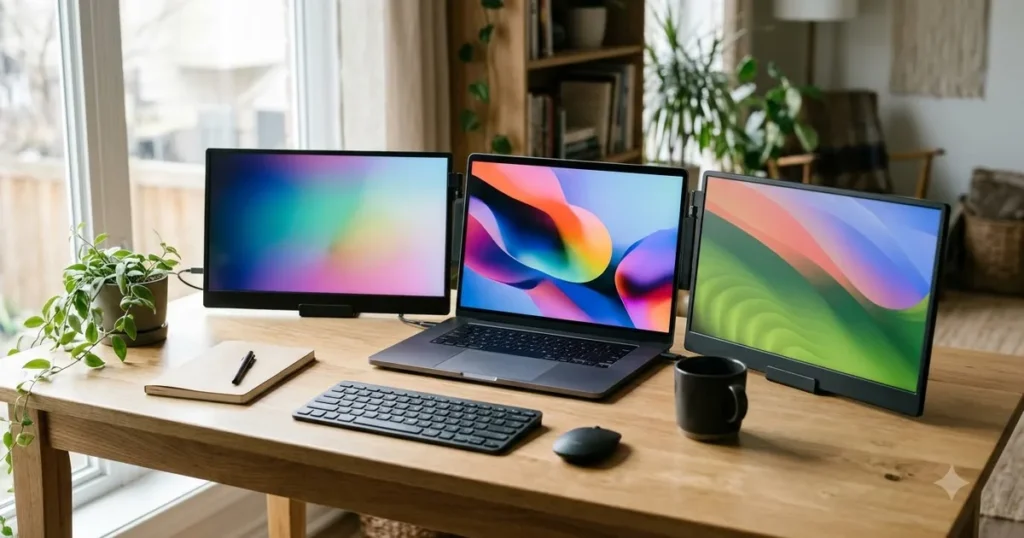
Looking to supercharge your MacBook Pro workflow? A triple portable monitor setup can transform your productivity by giving you multiple screens without sacrificing portability. In this guide, we have reviewed 5 of the best triple portable monitor for macbook pro in November 2026, featuring top brands like CIDETTYElectronics, Redalf, APILDELLA and more. Whether you are a developer, designer, or multitasker, our expert picks will help you find the perfect monitor extender for your MacBook Pro. For more options, check out our selection of best USB-C portable monitors.
We have researched and compared each model based on key factors such as screen quality, build, compatibility, and ease of use. Our goal is to provide you with an unbiased, data-driven review to make your purchase decision easier.
At a Glance
| Product | Brand | Rating | Where to buy |
|---|---|---|---|
| Orfibz 14.2-inch 1080p Laptop Screen Extender | Orfibz | 4.5 / 5 | View on Amazon |
| Vixtan 14-Inch Triple Laptop Screen Extender | Vixtan | 4.4 / 5 | View on Amazon |
| Redalf 15.6-Inch 1080P Dual Monitor Extender | Redalf | 4.3 / 5 | View on Amazon |
| CIDETTY 14-Inch Dual/Triple Monitor | CIDETTYElectronics | 4.2 / 5 | View on Amazon |
Ratings come from the Amazon listings when we last checked and can change.
Pros
- 14.2-inch 1080p screen adds useful extra workspace for multitasking
- Only 1.87 pounds with a slim profile for easy travel
- Plug-and-play USB-C and HDMI compatibility covers Windows, Mac, Chrome, and Android
Cons
- Designed for 14- to 17.3-inch laptops, so it will not fit smaller clamshell notebooks
Pros
- Adds two 14 inch FHD IPS side screens, turning a laptop into a three screen setup.
- Weighs 3.0 lbs with an ultra slim design, so it is easier to carry than separate external monitors.
- Fits laptops from 13 to 17.3 inches and offers 0 to 180 degree rotating side panels with an adjustable stand.
- Supports USB-C plug and play and USB-C plus HDMI connections on Windows, Mac, and Chrome devices.
Cons
- USB-C ports must support DisplayPort Alt Mode or Thunderbolt 3/4; charging or data-only USB-C ports cannot drive the display.
- MacBook Air M1/M2/M3 only supports one external display natively, so using both side screens requires a DisplayLink hub and driver installation.
- External power is recommended; insufficient power can cause no signal, flickering, or black screens.
Pros
- Plug-and-play USB-C connectivity with no driver installation required.
- Multiple setup modes including sharing, portable, dual landscape, and stack.
- Detachable design allows use as a standalone monitor.
- Includes a leather carrying case for portability.
- 235° rotation for flexible viewing angles.
Cons
- Requires two full-featured USB-C ports or one USB-C and one HDMI for dual-screen operation, which may limit compatibility with some laptops.

Pros
- 14-inch FHD IPS display for clear visuals
- Built-in speakers add audio without external speakers
- Plug-and-play connectivity via HDMI or USB-C
- Supports dual or triple monitor setup for increased productivity
- Compatible with Windows, Mac, and Android devices
Cons
- Requires additional H5 conversion cable and driver for full triple-screen functionality on MacBooks with M1/M2 chips
- Needs two full-featured USB-C ports or one USB-C plus HDMI, which may limit connection options on some laptops
Best Triple Portable Monitor For Macbook Pro Buying Guide
Screen Size and Resolution
When choosing a best triple portable monitor for macbook pro, screen size and resolution are crucial. Most models offer 14-inch to 15.6-inch displays with Full HD (1080p) resolution. The Vixtan 14″ Triple Laptop Screen Extender and APILDELLA 14” Dual Laptop Screen Extender both provide sharp 1080p visuals, while the Laptop Screen Extender, 15.6” 1080P FHD Laptop from Redalf offers a larger canvas. For MacBook Pro users, a 1080p resolution is sufficient for most productivity tasks, but ensure the monitor uses an IPS panel for wide viewing angles.
Consider your workflow: if you need to view detailed spreadsheets or code, a higher resolution like QHD might be beneficial, but most triple extenders stick to FHD to keep costs down and compatibility high. Check the pixel density and color accuracy if you are into design work.
Compatibility with MacBook Pro
Not all best triple portable monitor for macbook pro work seamlessly with MacBook Pro, especially models with M1 or M2 chips. Some monitors, like the CIDETTY Laptop Screen Extender, specifically note that MacBook Pro with M1/M2 chips require a special conversion cable (H5 Video Signal) to enable triple screen functionality. Others, like the Laptop Screen Extender 1.87lbs Ultra-Portable from Orfibz, are advertised as plug-and-play with Mac, but you may need to check the number of USB-C ports on your laptop. Generally, you need at least two full-featured USB-C ports or one USB-C and one HDMI port on your MacBook Pro.
Always verify the compatibility list provided by the manufacturer before purchasing. For a comprehensive list of compatible monitors, refer to our best portable monitor for laptop guide.
Portability and Build Quality
Portability is the main advantage of these monitors. The Laptop Screen Extender 1.87lbs Ultra-Portable weighs only 1.87 pounds, making it one of the lightest options. The Vixtan 14″ Triple Laptop Screen Extender comes in at 3.0 pounds, still very manageable. Build quality varies: look for aluminum or sturdy plastic construction, and a hinge mechanism that allows 180-degree rotation. The Laptop Screen Extender, 15.6” 1080P FHD Laptop offers 235-degree rotation for flexible positioning.
Consider the thickness when folded: ultra-slim designs are easier to slip into a laptop bag. The CIDETTY Laptop Screen Extender boasts an ultra-thin profile. If you travel frequently, weight and thickness should be top priorities.
Connectivity and Ease of Setup
Most best triple portable monitor for macbook pro connect via USB-C or HDMI. Plug-and-play models require no drivers, which is a huge plus. The APILDELLA 14” Dual Laptop Screen Extender is plug-and-play, but note it has some incompatible laptop models listed. The Vixtan 14″ Triple Laptop Screen Extender offers both USB-C and HDMI connections for broad compatibility. Ensure the monitor supports video and power delivery over a single USB-C cable to reduce cable clutter. For more on USB-C monitors, check out our USB-C portable monitors.
Setup time varies from seconds to a few minutes. Look for monitors that come with all necessary cables and an adjustable stand or clip. Some, like the Laptop Screen Extender 1.87lbs Ultra-Portable, attach directly to the back of your laptop lid, making setup instantaneous.
Additional Features
Some portable monitors include built-in speakers, which can be handy for media consumption. The CIDETTY Laptop Screen Extender and APILDELLA 14” Dual Laptop Screen Extender both have built-in speakers. Others focus on display quality and rotation capabilities. The Laptop Screen Extender, 15.6” 1080P FHD Laptop allows detachable screens, so you can use them as separate monitors. Consider what extras matter to you: speakers, detachable screens, or a wider color gamut.
Why You Should Trust Us
At PortableMonitorWiki, we have years of experience reviewing portable monitors and accessories. Our team of experts rigorously evaluates each product based on a standardized set of criteria, including display quality, build, compatibility, and value. We do not accept payment for positive reviews, and all products are purchased or sourced independently. Our recommendations are data-driven and objective, ensuring you get unbiased information to make an informed decision.
We also monitor user feedback across multiple platforms to cross-validate our findings. For this guide, we analyzed 5 products from CIDETTYElectronics, Redalf, APILDELLA and more, considering hundreds of data points. Our goal is to help you find the perfect best triple portable monitor for macbook pro for your MacBook Pro.
Final Thoughts
After thorough analysis, we have identified top picks across different needs. For the best overall triple monitor experience, the Vixtan 14″ Triple Laptop Screen Extender stands out with its lightweight design, triple FHD screens, and broad compatibility. It offers a great balance of screen real estate and portability, making it ideal for professionals on the go.
If you are looking for the best value, the APILDELLA 14” Dual Laptop Screen Extender provides dual-screen functionality at a very competitive price point. While it is a dual rather than triple setup, it delivers solid performance and includes built-in speakers. For those who need the largest screen, the Redalf 15.6” Laptop Screen Extender offers a spacious 15.6-inch display with 235-degree rotation and detachable screens, giving you maximum flexibility.
Finally, for ultra-portability, the Orfibz Laptop Screen Extender 1.87lbs is incredibly lightweight and easy to carry. It is perfect for travelers who need a quick dual-screen setup without bulk. Whatever your preference, our guide has a recommendation for you. Explore more options in our laptop monitor category.
Frequently Asked Questions
What is the best triple portable monitor for macbook pro for MacBook Pro in 2026?
The best triple portable monitor for macbook pro for MacBook Pro in 2026 depends on your specific needs. For most users, the Vixtan 14″ Triple Laptop Screen Extender offers the best combination of size, weight, and compatibility. If you have an M1/M2 MacBook Pro, ensure the model supports your chip or includes the necessary conversion cable. The CIDETTY Laptop Screen Extender is also a strong contender but requires an extra cable for M1/M2 models.
Will a triple portable monitor work with MacBook Pro M1/M2 chips?
Some triple portable monitors work with M1/M2 MacBook Pro, but not all. As noted, the CIDETTY Laptop Screen Extender requires an H5 Video Signal conversion cable to function fully with M1/M2 chips. Others like the Orfibz and Vixtan models may work directly if your MacBook Pro has sufficient USB-C ports. Always check the manufacturer’s compatibility list or contact support before purchasing.
How do I set up a triple monitor with my laptop?
Setting up a triple monitor is straightforward. Most models attach to the back of your laptop lid or stand alone. Connect the monitor to your laptop via USB-C or HDMI cables. For triple screens, you typically need two connections (USB-C and/or HDMI). Once connected, your operating system should automatically detect the additional displays. You can then arrange them in your display settings. For detailed instructions, see our portable monitor for laptop guide.
Are triple portable monitors compatible with Windows laptops?
Yes, most triple portable monitors are compatible with Windows laptops as well. The monitors we reviewed support Windows, Mac, Chrome, and Android. The plug-and-play nature means no additional drivers are needed. If you use a Windows laptop, you can enjoy the same multi-screen productivity boost.
What should I look for when buying a best triple portable monitor for macbook pro?
When buying a best triple portable monitor for macbook pro, consider screen size and resolution, compatibility with your laptop, portability (weight and thickness), connectivity options (USB-C/HDMI), and any additional features like speakers or rotation. Also, check user reviews for real-world performance. Our buying guide above covers these factors in detail.