Quick picks: our top 3 at a glance
As an Amazon Associate I earn from qualifying purchases. Prices and availability change.

LG has consistently pushed the boundaries of display technology, and 2026 is no exception. With the arrival of the newest lineup, there is no shortage of options for professionals, gamers, and everyday users. Whether you need a crisp 4K panel for creative work or a high-refresh-rate display for competitive gaming, the latest LG monitors deliver impressive performance and thoughtful features. In this guide, we take a close look at 7 of the most exciting new LG monitors available in November 2026, highlighting what makes each model stand out and helping you decide which one fits your needs.
Our team has analyzed specifications, feature sets, and user feedback to bring you a curated list of top contenders. If you are still exploring the wider world of displays, check out our best portable monitors roundup for more ideas. For now, let’s dive into the best new LG monitors that deserve your attention in 2026.
At a Glance
| Product | Brand | Rating | Where to buy |
|---|---|---|---|
| LG 27U411A-B 27" 1080p 120Hz Monitor | LG | 4.1 / 5 | View on Amazon |
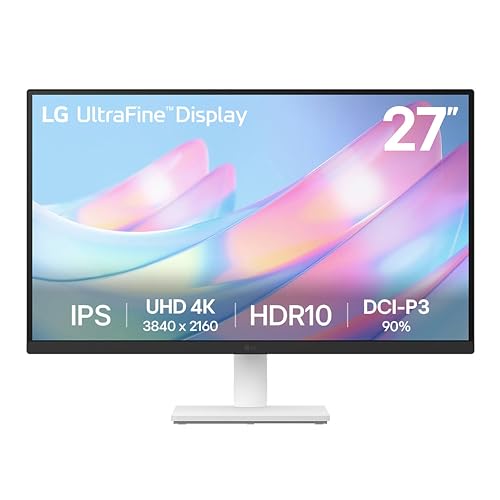
| LG 27US500-W Ultrafine 4K Monitor | LG | 4.8 / 5 | View on Amazon |
| LG 34SR60QC-W 34" QHD Curved Smart Monitor | LG | 4.7 / 5 | View on Amazon |
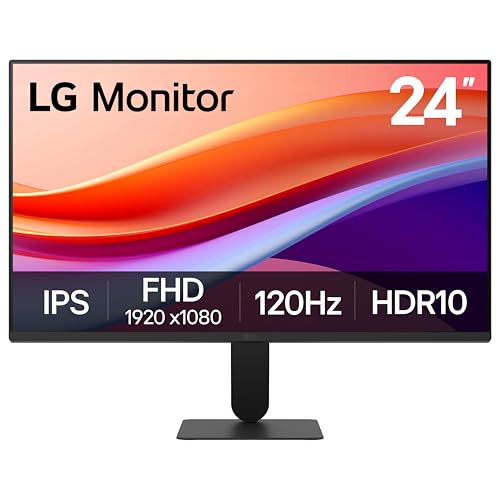
| LG 24U411A-B 24-Inch 120Hz IPS Monitor | LG | 4.2 / 5 | View on Amazon |
| LG 27G414B-B 27" 1080p 144Hz Gaming Monitor | LG | 4.4 / 5 | View on Amazon |
| LG 27U631A-B 27-Inch QHD IPS Monitor | LG | 4.6 / 5 | View on Amazon |
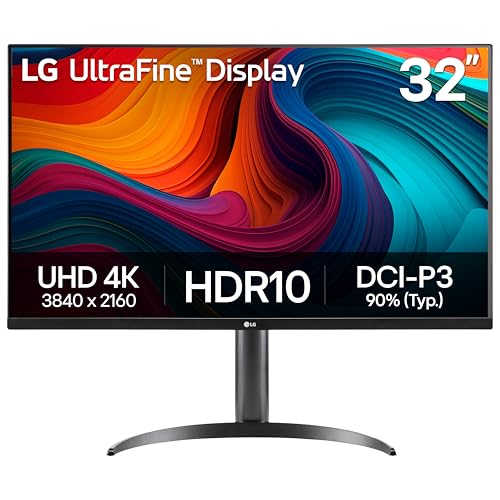
| LG 32UR550K-B 32-inch 4K UHD Monitor | LG | 4 / 5 | View on Amazon |
Ratings come from the Amazon listings when we last checked and can change.
Pros
- 120Hz refresh rate with 1ms motion blur reduction for smooth gaming.
- IPS panel with HDR10 support for vibrant colors and wide viewing angles.
- Reader Mode and Flicker Safe reduce eye strain.
- Virtually borderless design for seamless multi-monitor setups.
Cons
- 1080p resolution on 27-inch panel yields lower pixel density.
- Tilt-only adjustment; no height or swivel.
Pros
- 4K UHD resolution delivers sharp and detailed images.
- HDR10 support with 90% DCI-P3 for vibrant and accurate colors.
- IPS panel provides wide viewing angles and consistent colors.
- Borderless design is ideal for multi-monitor setups.
- Reader mode and flicker-safe technology reduce eye strain.
Cons
- Stand offers only tilt adjustment, no height or swivel.
- Only available in white color, which may not suit all setups.
Pros
- Ultrawide 21:9 QHD curved display with 1800R curve offers an immersive viewing experience
- Built-in webOS23 provides direct access to streaming services like Netflix, Prime Video, and Disney Plus
- 100Hz refresh rate and HDR10 support with 99% sRGB color gamut deliver smooth and vibrant visuals
- Apple AirPlay2 and HomeKit compatibility allow easy wireless casting from iOS and macOS devices
- Includes two HDMI ports and three USB ports for flexible connectivity
Cons
- Limited to HDMI inputs; lacks DisplayPort or USB-C for modern peripherals
- Magic Remote required for voice control is sold separately
- 100Hz refresh rate may not satisfy competitive gamers seeking higher frame rates
Pros
- 120Hz refresh rate with 1ms Motion Blur Reduction for smooth motion.
- IPS panel with HDR10 and 99% sRGB coverage for vibrant colors.
- Reader Mode reduces blue light for comfortable extended use.
- Slim bezels enable seamless multi-monitor arrangements.
Cons
- Only tilt adjustment; no height or swivel.
- Limited to a single HDMI input.
- 1080p resolution may not meet high-detail needs.

Pros
- 144Hz refresh rate with 1ms MBR for smooth motion
- G-Sync compatible and FreeSync for tear-free gaming
- HDR10 and 99% sRGB color accuracy
- Built-in stereo speakers and headphone output
- Height and tilt adjustable stand
Cons
- 1080p resolution on 27-inch screen offers lower pixel density than higher-resolution options

Pros
- High color accuracy with 99% sRGB and HDR10 support
- 100Hz refresh rate with Dynamic Action Sync for smoother gameplay
- USB-C connectivity with power delivery reduces cable clutter
- Eye-care features like Flicker Safe and Reader Mode for extended use
Cons
- 5ms response time may not satisfy competitive gamers
- 15W USB-C power delivery is insufficient for charging laptops
- No DisplayPort input, limited to HDMI and USB-C
Pros
- Covers up to 90% of the DCI-P3 color space for vibrant, lifelike visuals
- Height, tilt, and pivot adjustable stand for ergonomic comfort
- Includes gaming features like Dynamic Action Sync and Black Stabilizer for reduced input lag and better visibility in dark scenes
Cons
- Limited to 60Hz refresh rate, not ideal for high-frame-rate competitive gaming
- No built-in speakers mentioned, may require external audio
New Lg Monitors 2026 Buying Guide for 2026
Choosing the right LG monitor involves more than just picking the largest screen. Factors like resolution, refresh rate, color accuracy, and connectivity all play a role in how well a display suits your workflow or entertainment setup. Below, we break down the most important criteria to consider when shopping for a new LG monitor in 2026.
Display Resolution and Panel Type
The resolution determines how much detail you can see on screen. Full HD (1920 x 1080) remains a popular choice for budget-friendly setups, while QHD (2560 x 1440) offers a sharper image that is ideal for productivity and gaming. For creative professionals, 4K UHD (3840 x 2160) provides exceptional clarity and screen real estate, allowing you to edit photos and videos with precision. LG offers monitors across all these resolution tiers, so you can match the pixel density to your specific needs. If you’re into high-resolution portable displays, don’t miss our best 4K portable monitor roundup as well.
Panel technology is equally important. In-plane switching (IPS) panels are known for their wide viewing angles and accurate colors, making them a favorite among designers and everyday users. Vertical alignment (VA) panels deliver deeper blacks and higher contrast, while TN panels offer the fastest response times but at the cost of color reproduction. Most modern LG monitors, including the models we reviewed, use IPS technology, which strikes an excellent balance between color quality and response time.
Refresh Rate and Response Time
Refresh rate, measured in Hertz (Hz), indicates how many times the display updates per second. A standard monitor offers 60Hz, but higher refresh rates like 100Hz, 120Hz, or 144Hz provide smoother motion and reduce eye strain during long sessions. For gamers, a fast refresh rate can be the difference between victory and defeat. Several new LG monitors boast 120Hz or 144Hz panels, making them excellent choices for both casual and competitive play. The best 144Hz portable monitors are also worth exploring if you need a compact high-speed option.
Response time, typically measured in milliseconds (ms), measures how quickly a pixel changes color. Lower response times minimize ghosting and motion blur. LG’s 1ms Motion Blur Reduction technology on models like the LG 27G414B-B and the LG 27U411A-B ensures crisp visuals during fast-paced action. Pairing a high refresh rate with a low response time creates a responsive and fluid experience that benefits both work and play.
Color Accuracy and HDR Support
Color accuracy is critical for creative professionals who need to see true-to-life tones. Look for monitors that cover a high percentage of the sRGB or DCI-P3 color gamut. LG monitors like the LG 27US500-W and the LG 34SR60QC-W offer up to 99% sRGB or 90% DCI-P3 coverage, respectively, ensuring vibrant and accurate colors. HDR10 support further enhances the viewing experience by expanding the dynamic range, delivering brighter highlights and deeper shadows.
If you plan to edit videos or photos, a monitor with wide color gamut and HDR is a worthwhile investment. For general use or gaming, HDR still adds visual punch, making games and movies look more immersive. Keep in mind that true HDR performance also depends on peak brightness; many entry-level monitors offer HDR compatibility but not full HDR brightness. Check the specifications to match your expectations.
Connectivity and Ports
The ports on your monitor determine which devices you can connect and how easily. Standard options include HDMI and DisplayPort, which are essential for laptops, desktops, and gaming consoles. Some newer LG monitors, such as the LG 27U631A-B, feature USB-C with power delivery, allowing you to connect a laptop and charge it with a single cable. This is a major convenience for minimalists and anyone with a clean desk setup.
If you plan to use multiple peripherals, consider monitors with built-in USB hubs. Models like the LG 34SR60QC-W include multiple USB ports, making it easy to connect accessories. For wireless streaming, the LG Smart Monitor lineup offers Apple AirPlay 2 and Screen Share, so you can mirror your phone or tablet without additional cables. Think about your existing devices and choose a monitor that complements them.
Ergonomics and Smart Features
A comfortable viewing setup is essential for long hours of work or play. Adjustable stands that offer tilt, height, and pivot options allow you to position the monitor at eye level. The LG 32UR550K-B, for example, includes a fully adjustable stand, while the LG 27U411A-B offers tilt adjustment. If you plan to use a VESA mount, make sure the monitor has standard mounting holes.
Smart features add another layer of versatility. LG’s webOS platform, found on models like the LG 34SR60QC-W, brings built-in streaming apps directly to your display. You can watch Netflix, Disney Plus, and even access cloud-based productivity tools without connecting a PC. Features like Reader Mode and Flicker Safe reduce eye strain, while the Switch app lets you split the screen into multiple workspaces. These extras can significantly enhance your daily workflow.
Quick Specification Comparison
To help you compare the key specs at a glance, here is a table of the 7 LG monitors covered in this review.
| Model | Resolution | Refresh Rate | Color Gamut | Key Ports |
|---|---|---|---|---|
| LG 27U411A-B | Full HD (1920 x 1080) | 120Hz | 99% sRGB | HDMI |
| LG 34SR60QC-W | QHD (3440 x 1440) | 100Hz | 99% sRGB | HDMI, USB |
| LG 27US500-W | 4K UHD (3840 x 2160) | 60Hz | 90% DCI-P3 | HDMI, DisplayPort |
| LG 24U411A-B | Full HD (1920 x 1080) | 120Hz | 99% sRGB | HDMI |
| LG 27G414B-B | Full HD (1920 x 1080) | 144Hz | 99% sRGB | HDMI, DisplayPort |
| LG 27U631A-B | QHD (2560 x 1440) | 100Hz | 99% sRGB | HDMI, USB-C |
| LG 32UR550K-B | 4K UHD (3840 x 2160) | 60Hz | 90% DCI-P3 | HDMI, DisplayPort |
Why You Should Trust Us
Our recommendations are grounded in thorough research and a clear understanding of what makes a monitor great. We analyze official specifications, manufacturer descriptions, and user reviews to identify strengths and potential limitations. We also consider real-world use cases, from office productivity and creative work to high-octane gaming, so our picks are practical for a wide range of users.
Each monitor in this list was selected based on its features, build quality, and value within its category. By focusing on data-driven analysis rather than marketing hype, we aim to give you a trustworthy resource for your next monitor purchase.
Final Thoughts
After reviewing the full lineup, we are confident that there is a new LG monitor in 2026 for virtually every need. For a great balance of performance and value, we recommend the LG 27U411A-B 27-inch Full HD (1920 x 1080) as our best overall pick. It offers a smooth 120Hz refresh rate, vivid IPS colors, and a sleek borderless design at an accessible price point, making it ideal for both work and casual gaming.
If you are a creative professional or need maximum screen real estate, the LG 27US500-W Ultrafine Monitor 27-Inch 4K UHD delivers stunning 4K detail with 90% DCI-P3 coverage, making it our best pick for productivity. Meanwhile, gamers who demand ultra-fluid motion should look no further than the LG 27G414B-B 27-inch Ultragear IPS 1080p 144Hz 1ms, which combines a 144Hz refresh rate with 1ms MBR for a competitive edge.
For those who want a versatile all-in-one solution with smart features, the LG 34SR60QC-W 34-inch QHD (3440 x 1440) is an outstanding choice, especially for multitaskers and streamers. If you are also looking for a dedicated work-from-home setup, be sure to check out our best portable monitor for work from home guide. Whatever you choose, LG’s 2026 lineup proves that innovation and reliability are still at the forefront of the display market.
Frequently Asked Questions
What is the best new LG monitor in 2026?
The best new LG monitor depends on your use case. For most people, the LG 27U411A-B 27-inch Full HD (1920 x 1080) is an excellent all-rounder with a 120Hz refresh rate and strong value. If you need 4K clarity, the LG 27US500-W or LG 32UR550K-B are top picks, while gamers will love the 144Hz LG 27G414B-B.
What resolution should I choose for an LG monitor?
Your choice of resolution should match your hardware and tasks. Full HD is fine for general use and budget builds; QHD offers a sharp middle ground for work and gaming; 4K is ideal for creative professionals and large-screen setups. For most users in 2026, a QHD or 4K monitor provides the best future-proofing.
Are LG monitors good for gaming in 2026?
Yes, LG makes some of the best gaming monitors on the market. Look for UltraGear models like the LG 27G414B-B, which offers a 144Hz refresh rate, 1ms response time, and adaptive sync technologies. Even non-gaming LG monitors with 120Hz panels, such as the LG 27U411A-B, provide a smooth gaming experience without breaking the bank.
Do LG monitors support HDR?
Most LG monitors released in 2026 support HDR10, including the models in this review. Keep in mind that HDR support varies in quality; higher-end models like the LG 32UR550K-B offer up to 90% DCI-P3 color coverage, providing richer and more vibrant HDR content. Always check the specs to see the color depth and brightness ratings.
What is the difference between LG UltraFine and LG Smart Monitor?
LG UltraFine monitors are designed for professional and productivity use, with high resolution and color accuracy, while LG Smart Monitors include built-in webOS and streaming apps for entertainment and versatile connectivity. If you need a monitor that doubles as a smart TV, a Smart Monitor like the LG 34SR60QC-W is the way to go; for serious creative work, an UltraFine model is better equipped. For more detailed buying advice, browse our monitor guides.