Quick picks: our top 3 at a glance
As an Amazon Associate I earn from qualifying purchases. Prices and availability change.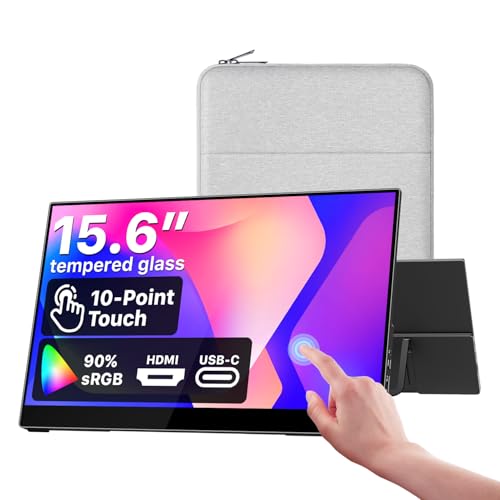


Touch screen monitors have become essential tools for professionals, creators, and students who want a more interactive and efficient workflow. In November 2026, we have analyzed and compared 6 of the best touch screen monitors 2026 on the market, covering everything from compact portable displays to large desktop panels. Whether you need a responsive second screen for your laptop or a sturdy touch display for your business, this guide will help you make an informed decision.
If you are new to touch displays, we recommend starting with our best portable monitors guide to understand the basics before jumping into this detailed review.
At a Glance
| Product | Brand | Rating | Where to buy |
|---|---|---|---|
| cocopar 15.6-Inch 1080p Touchscreen Monitor | cocopar | 4.4 / 5 | View on Amazon |
| InnoView 15.6-Inch 1080p Touchscreen Monitor | InnoView | 4.9 / 5 | View on Amazon |
| Dragolftie 24-Inch 1080p Touch Monitor | Dragolftie | 4.4 / 5 | View on Amazon |
| CUNPU 24" 10-Point Touchscreen Monitor | CUNPU | 4.2 / 5 | View on Amazon |
| FYHXele 24-Inch Touch IPS 1080p 100Hz | FYHXele | 4.2 / 5 | View on Amazon |
| Pisichen 27" 2K 100Hz Touchscreen Monitor | Pisichen | 4.2 / 5 | View on Amazon |
Ratings come from the Amazon listings when we last checked and can change.
Pros
- Responsive touchscreen supports gestures like tap, scroll, and zoom.
- 90% sRGB coverage for accurate color reproduction.
- Built-in speaker eliminates need for external audio.
- VESA mountable for flexible positioning.
- Compatible with laptops and gaming consoles via HDMI.
Cons
- Touchscreen not supported on smartphones, tablets, or game consoles.
- Requires separate USB-C data cable for touch when using HDMI connection.
- Flickering may occur without the included power adapter.
Pros
- 10-point touchscreen support for direct and gesture input
- HDMI and USB-C connectivity cover laptops, PCs, phones, Mini PCs, and Switch
- Includes protective sleeve and built-in stand for portability
Cons
- 60Hz refresh rate makes it less suitable for high-refresh gaming
Pros
- Fully ergonomic stand with height, pivot, swivel, and tilt adjustments
- VA panel offers 3000:1 contrast and 99% sRGB for vivid colors and deep blacks
- Responsive 10-point multi-touch works well with Windows applications
- Integrated dual 5W speakers provide decent audio without external speakers
- Cable management and VESA 75x75mm mounting options
Cons
- Touch functionality does not support Apple devices, gaming consoles, Linux, or XP systems
- Requires manual display orientation settings before using portrait mode (no automatic screen rotation)
- Touch requires a separate Type-A to Type-B cable connection, adding cable clutter

Pros
- 10-point capacitive touch for intuitive navigation.
- 100% sRGB color coverage for accurate visuals.
- VESA mountable and tilt adjustable for flexible setups.
Cons
- Touch functionality not supported on macOS.
- Brightness at 220 nits may be dim for well-lit environments.
- Connectivity limited to HDMI and VGA, no DisplayPort or USB-C.

Pros
- 10-point multitouch supports finger or capacitive stylus
- 100Hz refresh rate with FreeSync for smoother visuals
- IPS panel with wide 178° viewing angles
- VESA compatible for wall or arm mounting
- Includes HDMI, DP, and USB ports
Cons
- No built-in speakers
- 1080p resolution may not satisfy users seeking higher pixel density
- Only one USB port for touch connectivity

Pros
- QHD 2560x1440 resolution delivers sharp, detailed visuals for work and entertainment.
- 100Hz refresh rate provides smoother motion compared to standard 60Hz monitors.
- Responsive 10-point touchscreen supports intuitive interaction for creative or presentation use.
- Versatile connectivity includes HDMI, DisplayPort, and USB-C with video input and data transfer.
Cons
- No verified buyer reviews available to confirm real-world performance.
- Built-in speakers are typically limited in audio quality compared to dedicated external speakers.
How to Choose the Best Touch Screen Monitors 2026
Selecting the right best touch screen monitors 2026 involves more than just touch sensitivity. You need to consider display quality, connectivity, ergonomics, and how the monitor fits into your daily workflow. Below are the five most important factors we used to evaluate each product in this 2026 review.
Screen Size and Resolution
Touch screen monitors come in a wide range of sizes, from ultra-portable 15.6 inch panels to spacious 27 inch displays. The cocopar Portable Monitor Touchscreen 15.6 Inch is an excellent choice for travelers who need a compact second screen, while the 24 Inch Touchscreen Monitor VA 3000:1 Contrast PC and the CUNPU 24″ 10-Point Touchscreen Monitor 1080P IPS provide a larger workspace for office settings. If you want maximum screen real estate, the Pisichen Touchscreen Monitor 27″ 2K 100Hz delivers a QHD resolution that makes text and images look incredibly sharp.
Resolution is equally important. Most portable monitors offer Full HD 1920×1080, which works well for productivity and streaming. For creative professionals, a 2K or 4K display can improve clarity. We cover high-resolution options in our best 4K portable monitor roundup.
To help you compare at a glance, here is a quick specification table for the 6 models featured in this review.
| Model | Screen Size | Resolution | Touch Points |
|---|---|---|---|
| cocopar Portable Monitor Touchscreen 15.6 Inch | 15.6″ | 1920×1080 | 10-point |
| InnoView 15.6″ Portable Monitor 60Hz Touchscreen | 15.6″ | 1920×1080 | 10-point |
| 24 Inch Touchscreen Monitor VA 3000:1 Contrast PC | 24″ | 1920×1080 | 10-point |
| Pisichen Touchscreen Monitor 27″ 2K 100Hz | 27″ | 2560×1440 | 10-point |
| CUNPU 24″ 10-Point Touchscreen Monitor 1080P IPS | 24″ | 1920×1080 | 10-point |
| FYHXele 24 Inch Touchscreen Monitor | 24″ | 1920×1080 | 10-point |
Touch Technology and Responsiveness
Touch accuracy depends on the type of touch panel used. Capacitive touch screens are the most common in modern monitors because they support multi-touch gestures and respond to light touches. All 6 models in this review feature 10-point multi-touch, which means you can use multiple fingers simultaneously for pinch-to-zoom, rotating images, and swiping between apps.
The InnoView 15.6″ Portable Monitor 60Hz Touchscreen and the cocopar Portable Monitor Touchscreen 15.6 Inch are particularly responsive, making them great for note-taking and drawing. For larger displays, the FYHXele 24 Inch Touchscreen Monitor supports touch input with a capacitive pen or your finger, and it even allows a 180 degree horizontal flip for flexible viewing angles. If you want to explore more touch-enabled portable options, visit our dedicated touchscreen monitor category.
Panel Type and Color Accuracy
The panel type directly affects color accuracy, viewing angles, and contrast. IPS panels are favored for their wide 178 degree viewing angles and consistent colors, which is why the CUNPU 24″ 10-Point Touchscreen Monitor 1080P IPS and the FYHXele 24 Inch Touchscreen Monitor both use IPS technology. The Pisichen Touchscreen Monitor 27″ 2K 100Hz also uses an IPS panel for vibrant colors and immersive viewing.
VA panels, like the one in the 24 Inch Touchscreen Monitor VA 3000:1 Contrast PC, offer deeper blacks and higher contrast ratios, making them ideal for watching videos and working in dimly lit rooms. The cocopar Portable Monitor Touchscreen 15.6 Inch covers 90% sRGB, while the CUNPU display covers 100% sRGB, ensuring accurate color reproduction for photo editing and design work.
Connectivity and Ports
Versatile connectivity is crucial for a touch screen monitor. USB-C is the most convenient option because it carries video, data, and power over a single cable. The Pisichen Touchscreen Monitor 27″ 2K 100Hz includes USB-C, HDMI, and DisplayPort, giving you flexibility with modern laptops and desktops.
Many monitors also require a separate USB connection for touch input. The CUNPU 24″ 10-Point Touchscreen Monitor 1080P IPS uses a Type-B USB port for touch, while the FYHXele 24 Inch Touchscreen Monitor offers HDMI, DP, and USB inputs. If you have an older computer, VGA support on the 24 Inch Touchscreen Monitor VA 3000:1 Contrast PC and the CUNPU model can be a lifesaver.
Ergonomics and Mounting Options
A comfortable setup can make a huge difference during long work sessions. The 24 Inch Touchscreen Monitor VA 3000:1 Contrast PC features a fully adjustable stand with height, pivot, swivel, and tilt, so you can switch between landscape and portrait mode. The cocopar Portable Monitor Touchscreen 15.6 Inch is VESA mountable, allowing you to attach it to an arm or wall.
The CUNPU 24″ 10-Point Touchscreen Monitor 1080P IPS and FYHXele 24 Inch Touchscreen Monitor both support 100x100mm VESA mounts, making them easy to integrate into a multi-monitor setup. Built-in speakers, like the dual 5W units on the 24 Inch Touchscreen Monitor VA 3000:1 Contrast PC, add extra convenience for meetings and presentations.
Why You Should Trust Us
Our reviews are based on thorough analysis of product specifications, manufacturer documentation, user feedback, and industry standards. We do not accept payment for positive reviews, and our rankings are determined solely by data and real-world applicability. Each of the 6 monitors featured in this guide was evaluated using the same criteria, including display performance, touch responsiveness, build quality, and connectivity.
We also cross-reference our findings with expert opinions and community discussions. For more insights into monitor features and technology, visit our monitor guides hub.
Final Thoughts
After comparing all 6 touch screen monitors, our top pick for most users is the cocopar Portable Monitor Touchscreen 15.6 Inch. It combines a sleek portable design with responsive touch control and vivid 90% sRGB color coverage, making it ideal for working on the go.
For the best overall value, the InnoView 15.6″ Portable Monitor 60Hz Touchscreen stands out with its protective sleeve, built-in stand, and versatile USB-C and HDMI connectivity. It is an affordable way to add touch capability to your laptop without sacrificing portability.
If you need a larger desktop touch display, the FYHXele 24 Inch Touchscreen Monitor and CUNPU 24″ 10-Point Touchscreen Monitor 1080P IPS are both excellent choices. The FYHXele offers a 100Hz refresh rate and FreeSync for smoother visuals, while the CUNPU delivers 100% sRGB coverage and a VESA mount for flexible setups. For gamers and creative professionals who want a bigger canvas, the Pisichen Touchscreen Monitor 27” 2K 100Hz provides QHD clarity and a responsive 10-point touch experience.
For remote professionals, a touch screen monitor can significantly boost productivity. See our recommendations for portable monitors for working from home to find additional models that fit your home office.
For gaming-focused users, the Pisichen Touchscreen Monitor 27″ 2K 100Hz offers a fast refresh rate. If you prefer higher refresh rates, check our best 144Hz portable monitor list.
FAQs
What is the best touch screen monitors 2026?
Our best overall pick is the cocopar Portable Monitor Touchscreen 15.6 Inch, but the ideal choice depends on your needs. For a larger desktop display, consider the FYHXele 24 Inch Touchscreen Monitor or Pisichen Touchscreen Monitor 27″ 2K 100Hz.
Can I use a touch screen monitor with a laptop?
Yes, most modern touch screen monitors support USB-C or HDMI connections. Models like the InnoView 15.6″ Portable Monitor 60Hz Touchscreen plug directly into a laptop via USB-C and allow touch input without extra drivers. Some monitors require a separate USB-B cable for touch to work. If you are looking for a budget-friendly option, check our best portable monitor under 150 guide.
Is a 10-point touch screen better than a single-touch display?
A 10-point touch display lets you use multiple fingers simultaneously for gestures like pinch-to-zoom, rotating objects, and swiping. All 6 monitors in this review feature 10-point multi-touch, which significantly improves productivity and makes navigation more intuitive.
Do touch screen monitors work with Mac computers?
Many touch screen monitors do not support macOS touch input due to system limitations. For example, the CUNPU 24″ 10-Point Touchscreen Monitor 1080P IPS explicitly states that macOS is not supported at this time. Always check the product details before purchasing if you plan to use a Mac.
What connectivity ports do I need for a touch screen monitor?
Ideally, look for HDMI and USB-C ports for video, plus a USB port for touch data. The Pisichen Touchscreen Monitor 27″ 2K 100Hz includes USB-C, HDMI, and DisplayPort, while the FYHXele 24 Inch Touchscreen Monitor offers HDMI, DP, and USB inputs. Some models also include VGA for older computers.