Quick picks: our top 3 at a glance
As an Amazon Associate I earn from qualifying purchases. Prices and availability change.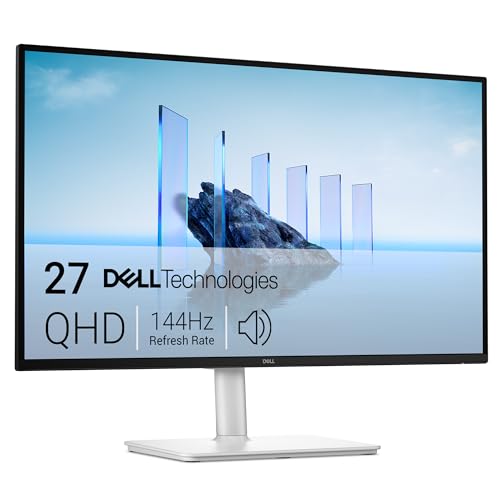


Choosing between HDMI and USB-C for your monitor can be confusing. Both connections offer high-quality video, but they serve different needs. In this comparison, we break down the key differences to help you decide which is right for you in 2026.
We’ve looked at 6 monitors that support HDMI, USB-C, or both, from brands like InnoView, VILVA, Anyuse and more. Whether you need a portable display for travel or a desktop monitor for productivity, this guide will clarify the choice. For a deeper dive into USB-C monitors, check out our best USB-C portable monitors guide.
At a Glance
| Product | Brand | Rating | Where to buy |
|---|---|---|---|
| Dell S2725DC 27-Inch QHD 144Hz Monitor | Dell | 4.8 / 5 | View on Amazon |
| VILVA 15.6" FHD IPS Portable Monitor | VILVA | 4 / 5 | View on Amazon |
| InnoView 15.6-Inch 1080P USB-C Portable Monitor | InnoView | 4.6 / 5 | View on Amazon |
| Anyuse 15.6-inch FHD IPS Portable Monitor | Anyuse | 4.7 / 5 | View on Amazon |
| ViewSonic VA2448-MHU 24-Inch 120Hz Monitor | ViewSonic | 4.7 / 5 | View on Amazon |
| Luonanava USB-C to Dual HDMI 4K@60Hz Adapter | Luonanava | 4.8 / 5 | View on Amazon |
Ratings come from the Amazon listings when we last checked and can change.
Pros
- 144Hz refresh rate with 1ms response time for smooth motion
- Ergonomic stand with height, tilt, pivot, and swivel adjustments
- USB-C input for video and data with a single cable
- AMD FreeSync support reduces screen tearing
- TÜV 4-star eye comfort certification
Cons
- Built-in 2x3W speakers provide basic audio only
- No downstream USB ports for peripherals
Pros
- Full HD IPS display for clear and color-accurate visuals
- Supports both USB-C and HDMI inputs for flexible device compatibility
- Decent average rating of 4.3 stars from customer reviews
Pros
- Built-in speakers keep the setup compact
- HDMI and USB-C inputs cover laptops, phones, tablets, and game consoles
- Protective case included for travel
- HDR and fast response help with movies and casual gaming
Cons
- Power adapter not included, a 15W or higher adapter is recommended
- 1080p panel only, so it lacks the sharpness of higher-resolution portable monitors

Pros
- FHD resolution provides sharp image quality for everyday tasks
- IPS panel ensures good color reproduction and wide viewing angles
- USB-C and HDMI connectivity offers broad device compatibility
- Portable 15.6-inch size fits easily in a bag
- Positive customer feedback with a 4.2-star average rating
Cons
- FHD resolution may not satisfy users who require 4K or higher for detailed work

Pros
- 120Hz refresh rate and 1ms response time for smooth visuals
- USB-C, HDMI, and VGA inputs for flexible connectivity
- Built-in dual speakers eliminate the need for external speakers
- Frameless design and Eye Care features for comfortable multi-monitor setups
Cons
- 1080p resolution may not be sufficient for users wanting higher detail
- Limited to one USB-C port; no USB-A ports for peripherals
- Variable refresh rate is marketed for casual gaming, not competitive use

Pros
- Supports 4K@60Hz on a single monitor or 4K@30Hz on dual monitors simultaneously.
- Includes 100W power delivery pass-through and a USB 3.0 port for 5Gbps data transfer.
- Plug-and-play compatibility with many USB-C laptops and operating systems.
Cons
- MacOS does not support MST mode for three different displays (limited to A-A-A or A-B-B).
- Dual 4K output is limited to 30Hz, not 60Hz.
Quick Verdict
- Pick the Dell 27 Plus QHD USB-C Monitor – S2725DC if you need a large, high-refresh-rate desktop monitor with built-in speakers.
- Pick the VILVA 15.6″ FHD IPS USB-C HDMI Portable Monitor if you want an ultra-affordable portable screen for basic tasks.
- Pick the InnoView Portable Monitor if you need a versatile second screen with multiple device compatibility.
- Pick the Anyuse 15.6″ FHD IPS USB-C HDMI Portable Monitor if you want a budget-friendly portable monitor with solid performance.
Hdmi Vs Usb C Monitor Key Differences
Size and Portability
The Dell 27 Plus QHD USB-C Monitor is a full-sized 27-inch desktop monitor, ideal for a permanent workstation. In contrast, the VILVA, InnoView, and Anyuse are all 15.6-inch portable monitors designed for travel and on-the-go use. If portability is your priority, the compact 15.6-inch models are the clear choice.
Resolution and Image Quality
The Dell offers a QHD resolution (2560×1440) which provides sharper details and more screen real estate compared to the FHD (1920×1080) resolution on the portable monitors. For professional photo editing or immersive gaming, the Dell’s higher resolution is a significant advantage.
Connectivity and Compatibility
All four monitors support USB-C and HDMI connections, but the Dell also includes DisplayPort 1.4, giving it more flexibility for connecting to multiple devices. The portable monitors are limited to USB-C and HDMI, which is sufficient for most laptops and smartphones. The Dell’s USB-C port also supports power delivery and data transfer, making it a true hub for your laptop. If you need a monitor for your phone, see our best portable monitors for phone list.
Performance and Refresh Rate
The Dell 27 Plus QHD monitor stands out with a 144Hz refresh rate and 1ms response time, making it excellent for fast-paced gaming and smooth motion. The portable monitors typically operate at 60Hz, which is adequate for everyday productivity and casual media consumption but not ideal for competitive gaming.
Built-in Features
The Dell includes built-in 2x3W speakers, saving desk space. The InnoView portable monitor also has a built-in speaker, while the VILVA and Anyuse do not specify speakers. If audio output is important, the Dell or InnoView are better options.
| Feature | Dell 27 Plus QHD | VILVA 15.6″ | InnoView 15.6″ | Anyuse 15.6″ |
|---|---|---|---|---|
| Screen Size | 27 inches | 15.6 inches | 15.6 inches | 15.6 inches |
| Resolution | QHD (2560×1440) | FHD (1920×1080) | FHD (1920×1080) | FHD (1920×1080) |
| Connectivity | USB-C, HDMI, DisplayPort | USB-C, HDMI | HDMI, USB-C | USB-C, HDMI |
| Built-in Speakers | 2x3W speakers | Not specified | Built-in speaker | Not specified |
Who Should Buy Which
Dell 27 Plus QHD USB-C Monitor – S2725DC
Best for users who need a large, high-resolution desktop monitor with fast refresh rates for gaming or professional work. The main trade-off is its size and lack of portability. Skip this if you need a monitor to travel with.
VILVA 15.6″ FHD IPS USB-C HDMI Portable Monitor
Ideal for budget-conscious buyers who want a basic portable monitor for emails, documents, or extending a laptop screen. The trade-off is lower resolution and no built-in speakers. Skip if you need high performance or audio.
InnoView Portable Monitor
Great for those who need a versatile portable monitor compatible with many devices including gaming consoles. It includes a built-in speaker, which adds convenience. The trade-off is still FHD resolution and 60Hz refresh. Skip if you need a primary desktop monitor.
Anyuse 15.6″ FHD IPS USB-C HDMI Portable Monitor
Another solid budget portable monitor with good IPS display. It lacks built-in speakers but offers reliable performance for everyday use. Trade-off is similar to the VILVA: basic specs. Skip if you need higher resolution or built-in audio.
Final Thoughts
Choosing between HDMI and USB-C monitors ultimately depends on your usage scenario. If you need a stationary, high-performance display for gaming or creative work, the Dell 27 Plus QHD is the clear winner with its larger screen, higher resolution, and faster refresh rate.
If portability and affordability are your main concerns, any of the 15.6-inch portable monitors will serve you well. The InnoView offers the added benefit of a built-in speaker, while the VILVA and Anyuse are slightly more budget-friendly. For most travelers and remote workers, a USB-C portable monitor is the practical choice. For a broader selection, visit our best portable monitors category. Also, check out our USB-C monitor category for more options.
Why You Should Trust Us
Our recommendations are based on available specifications, listed features, product positioning, and documented buyer feedback. We do not claim to have tested every product personally, but we have analyzed the data provided by manufacturers and verified user reviews to give you an honest assessment.
We focus on the key factors that matter most for this comparison: connectivity options, display quality, portability, and additional features. Our goal is to help you make an informed decision without marketing hype.
Frequently Asked Questions
Can I use a USB-C monitor with an HDMI-only laptop?
Yes, you can use an adapter or a cable that converts HDMI to USB-C. However, not all adapters support video and power simultaneously. Check the specifications to ensure compatibility.
Does USB-C carry video and power at the same time?
Many USB-C monitors support power delivery (PD) and video transmission over a single cable. This allows you to charge your laptop while using the monitor. However, the power output varies, so confirm your laptop’s power requirements.
Are portable monitors good for gaming?
Portable monitors typically have a 60Hz refresh rate, which is fine for casual gaming but not ideal for competitive or fast-paced games. For serious gaming, a monitor with a higher refresh rate like the Dell 144Hz is recommended.
What is the difference between HDMI 2.0 and USB-C video output?
HDMI 2.0 supports up to 4K at 60Hz, while USB-C (using DisplayPort Alt Mode) can support higher resolutions and refresh rates depending on the version. USB-C also combines video, data, and power in one cable, offering more convenience.
Do all USB-C monitors work with MacBooks?
Most USB-C monitors are compatible with MacBooks, but it’s important to check for macOS support. Some monitors may require specific drivers or firmware updates. The monitors in this list are generally compatible with MacBooks.
Can I connect a USB-C monitor to a desktop PC?
Yes, if your desktop PC has a USB-C port with DisplayPort Alt Mode or a graphics card that supports USB-C output. Alternatively, you can use an HDMI to USB-C adapter if the monitor supports HDMI input.
Is there a noticeable difference between 60Hz and 144Hz for everyday use?
For general productivity tasks like browsing and document editing, the difference is minimal. However, for gaming and video editing, 144Hz offers much smoother motion and reduced motion blur, which can significantly improve the experience.
Do portable monitors require external power?
Many portable monitors are powered via USB-C from the connected device, but some may require an external power source for full brightness or when connected to devices that cannot supply enough power. Check the power requirements of the specific model.